Vertex Skew Component

Overview
This component is a vertex effect that applies a skew transformation to any Unity UI component. This can be useful for example for creating slanted text.
WebGL Demo
Properties
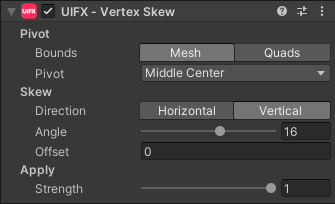
| Property | Type | Range | Default | Description |
|---|---|---|---|---|
| Pivot | ||||
| Bounds | Enum | Mesh | The bounds to use for defining the pivot. Options are: • Mesh - Use the entire mesh bounds.• Quads - Each quad will have its own pivot, this can be useful for text if you want to skew each individual character. | |
| Pivot | Enum | Middle Center | The position on the bounds to use as the pivot. The pivot point/edge will remain static during the skew. | |
| Skew | ||||
| Direction | Enum | Vertical | The direction of the skew. Options are: • Horizontal - Vertices only skew on the X axis.• Vertical - Vertices only skew on the Y axis. | |
| Angle | Float | [-180..180] | 16.0 | The angle of the skew. |
| Offset | Float | [-inf..inf] | 0.0 | The offset to translate in the direction of the skew. This is useful for creating slide-in/out animations at the same angle as the skew. |
| Apply | ||||
| Strength | Float | [0..1] | 1.0 | Strength of the effect. |
Usage
Add this component to any GameObject that contains a UI Graphic component (eg Text, Image, RawImage, etc).
Usage TextMeshPro
To use this vertex effect with TextMeshPro - Text (UI) simply add the Vertex Skew (TextMeshPro) component.
Alternatively add the TextMeshPro Mesh Modifier component before this one.